If you’re renewing Power Automate soon, expect a surprise. From November 1, new and renewed licenses no longer include free AI Builder credits, so AI features in your flows now cost extra.
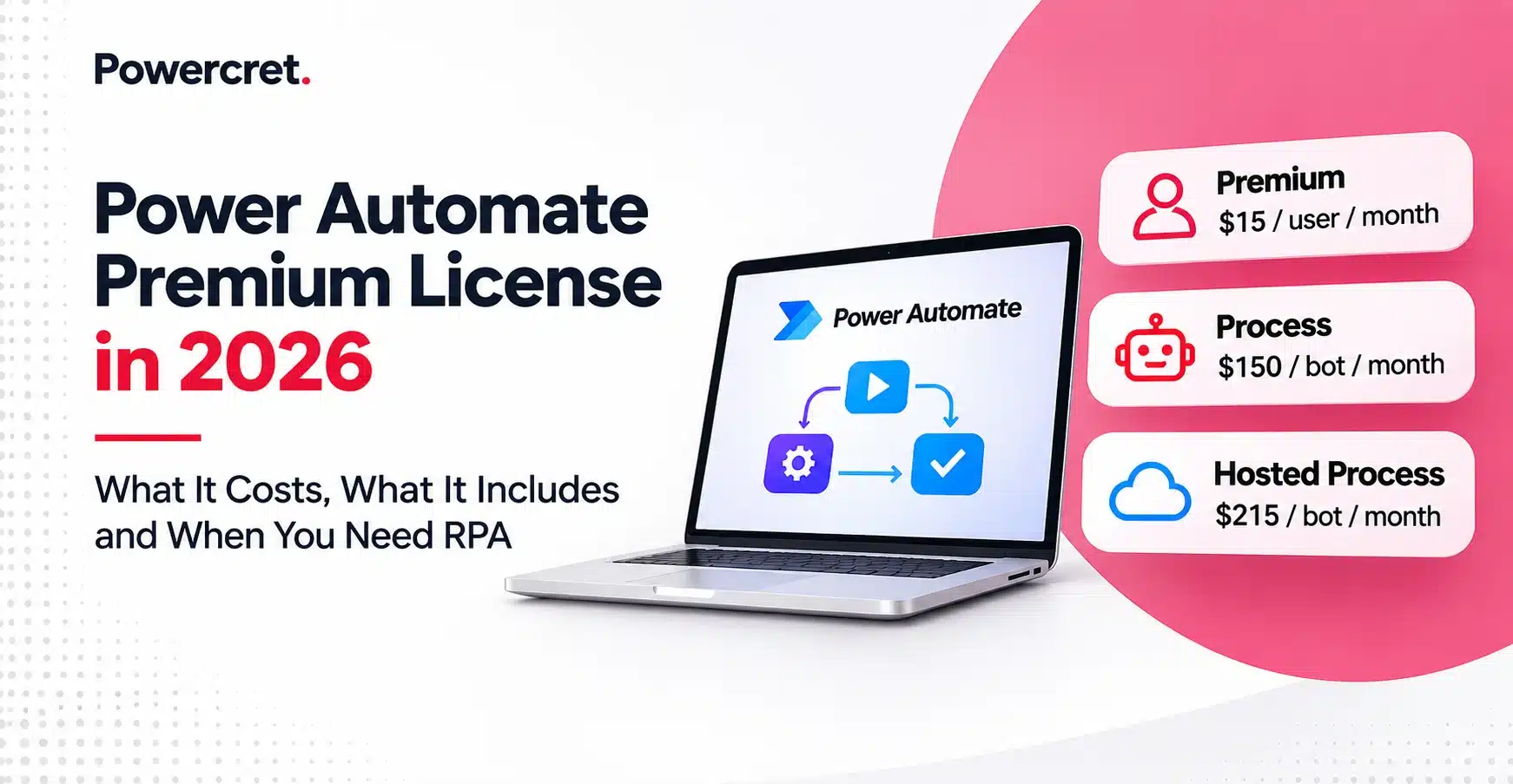
The base price hasn’t changed, though. A Power Automate Premium license costs $15 per user per month, billed yearly. It lets one person build Power Automate workflows, connect business apps, and run a bot on their own PC. Bots that run unattended, with nobody watching, need a separate license at $150 or $215 per bot.
In this guide:
- What Premium includes, and what it leaves out
- The full cost, from seats to support
- Who needs a seat, and when Process wins
- When you need RPA, and how many bots
- A 10-point check before your renewal
By the end of this guide, you’ll know exactly what to buy, who needs it, and what your next renewal should cost.
Key Takeaways: What a Power Automate Premium License Really Buys You
- Scope: One Power Automate Premium license gives a person 40,000 actions a day in every environment of your tenant.
- AI credits: Seats bought or renewed since November 1 carry no seeded AI Builder credits, so AI steps now bill through Copilot Credits.
- Who pays: Automated and scheduled flows need only the owner licensed, while instant flows need every runner licensed or a Process license.
- RPA: Premium runs attended desktop flows only, and every unattended run happening at the same time needs its own bot.
- Real cost: Seats are one line among several, so budget capacity, AI usage, build, governance, and support before you sign.
| License | US list price (annual billing) | Licensed to | Choose it when |
|---|---|---|---|
| Microsoft 365 seeded rights | Included in your plan | Each user | Flows use standard connectors only |
| Power Automate Premium license | $15 per user/month | A person | People build flows or run premium instant flows |
| Power Automate Process | $150 per bot/month | A flow, flow group, or machine | Many people run one flow, or you need an unattended bot |
| Power Automate Hosted Process | $215 per bot/month | A Microsoft-hosted machine | You want unattended RPA without your own VMs |
| Pay-as-you-go | $0.60 or $3 per run | Each premium run | Flows run rarely or seasonally |
Prices come from Microsoft’s Power Automate pricing page, checked on 2 November 2026. Microsoft prices vary by region, currency and licensing agreement.
What Does the Power Automate Premium License Include?
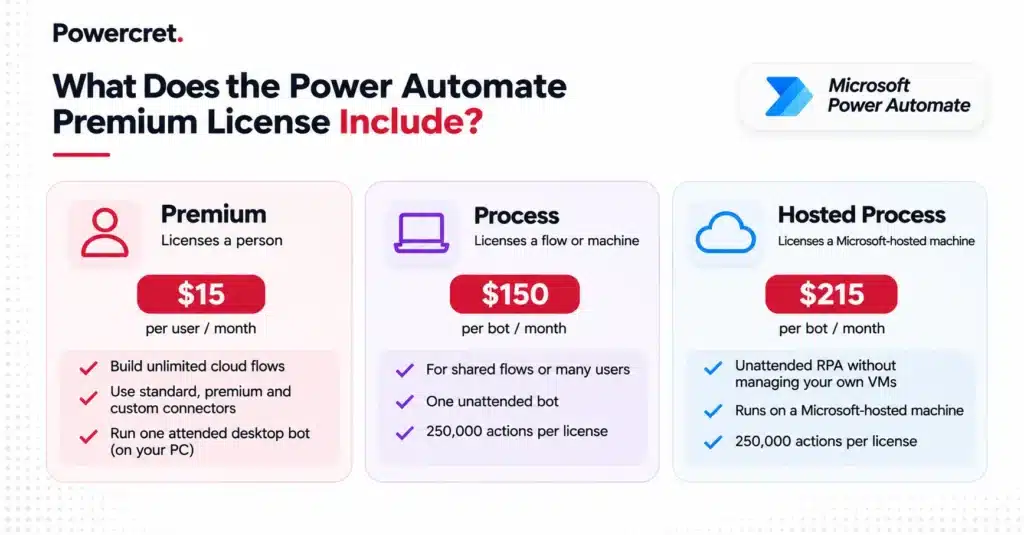
A Power Automate Premium license covers a person, not a flow. That person can build unlimited cloud flows within daily action limits, use standard, premium, and custom connectors, and run desktop flows on their own PC.
Here is how it compares with the two capacity licenses, based on Microsoft Learn’s license comparison.
| Entitlement | Premium | Process | Hosted Process |
|---|---|---|---|
| Licensed to | A user | A cloud flow, flow group or machine | A hosted machine or machine group |
| Where it applies | Every environment in the tenant | One environment | One environment |
| Daily actions | 40,000 per user | 250,000 per license | 250,000 per license |
| RPA | One attended bot | One unattended bot | One hosted bot |
| Process mining | 50 MB per license | Not included | Not included |
| Dataverse capacity | 250 MB database, 2 GB file | 50 MB database, 200 MB file | 50 MB database, 200 MB file |
All three also include Managed Environments for governance. During Microsoft’s current transition period, the action limits apply per flow rather than per user. And if an old contract still lists the $40 per user with attended RPA plan, Premium replaced it at $15.
A Premium seat stops at the edge of one person’s work, so these items need budget lines of their own:
- Unattended RPA: Bots that run with nobody signed in need Process or Hosted Process.
- Extra storage: Dataverse capacity beyond the pooled entitlement comes in 1 GB add-ons.
- Process Mining at scale: Enterprise discovery needs the $5,000 add-on for each 100 GB.
- Software a bot drives: Bots that use Windows or Office need the separate Microsoft 365 Unattended License.
- AI capacity on new contracts: New and renewed seats include no AI Builder credits.
Does a Power Automate Premium License Still Include AI Builder Credits?
New and renewed seats do not. Microsoft’s AI Builder licensing overview confirms that licenses bought or renewed from November 1, 2026 get no seeded credits. Older seats keep 5,000 credits a month until their contract term ends.
From then on, AI steps in your flows draw on Copilot Credits, at $0.01 each on pay-as-you-go. Reading an invoice, receipt, or ID document uses 8 credits per page. So a finance team processing 3,000 invoice pages a month spends about $240 on that step.
New customers can’t buy the AI Builder capacity add-on anymore either. Budget Copilot Credits as their own line, because extra Premium seats no longer bring any AI capacity.
What Does a Power Automate Premium License Really Cost? Licenses, Add-Ons and Implementation
The Power Automate Premium cost starts at $15 a seat. Your finance team also pays for capacity, AI usage and the work to build and govern flows. This table lists each line, with list prices from the Power Platform Licensing Guide, checked the same day.
| Cost line | Microsoft list price (USD) | What sets the quantity |
|---|---|---|
| Microsoft licenses | ||
| Power Automate Premium license | $15 per user/month | Makers, plus everyone running premium instant flows |
| Power Automate Process | $150 per bot/month | Shared flows, concurrent unattended runs, environments |
| Power Automate Hosted Process | $215 per bot/month | Unattended runs on Microsoft-managed machines |
| Pay-as-you-go runs (preview) | $0.60 per cloud or attended run, $3 per unattended run | Premium runs by unlicensed users |
| Add-ons and capacity | ||
| Process Mining add-on | $5,000 per 100 GB per tenant/month | Enterprise-wide process discovery |
| Dataverse database and file capacity | $40 and $2 per GB/month | Flow data beyond the pooled entitlement |
| Copilot Credits for AI steps | $0.01 per credit, pay-as-you-go | Pages, images and prompts processed monthly |
| Microsoft 365 Unattended License | Priced separately | Bots that drive Windows or Office |
| Implementation and run | ||
| Discovery, license fit-gap and governance | Scoped per project | Flows, owners, environments, DLP and CoE Starter Kit setup |
| Flow and RPA build | Scoped per project | Flow count, connectors, legacy screens, bot machines |
| Training, adoption and support | Scoped per project | Makers to enable, failed runs, connector changes |
You can buy licenses through a Microsoft partner, Microsoft sales, or Microsoft online, on monthly, annual, or multi-year terms.
| Renewing or expanding licenses? Powercret helps you find the most cost-effective license mix for your flows, users, and RPA needs. Get a clear cost model before you renew. |
Who Actually Needs a Power Automate Premium License?
It’s usually fewer people than a renewal quote assumes. Makers who build premium flows need a seat, and so does everyone who runs a premium instant flow without a Process license.
1. Is Power Automate Premium Included in Microsoft 365 or Dynamics 365?
Microsoft 365 does not include a Power Automate Premium license. Qualifying Microsoft 365 and Office 365 plans cover standard-connector cloud flows, up to 6,000 actions per user per day. Once a flow uses SQL Server, Salesforce, Dataverse, HTTP, or custom connectors, it needs paid licensing.
Dynamics 365 licenses go further, because they cover flows that run in the app’s context on its data sources. A standalone flow outside that context still needs Power Automate licensing.
That gap often appears when integrations get rebuilt after a CRM move, one of the things teams underestimate in a Salesforce to Dynamics 365 migration.
2. How the Flow’s Trigger Decides Who Pays
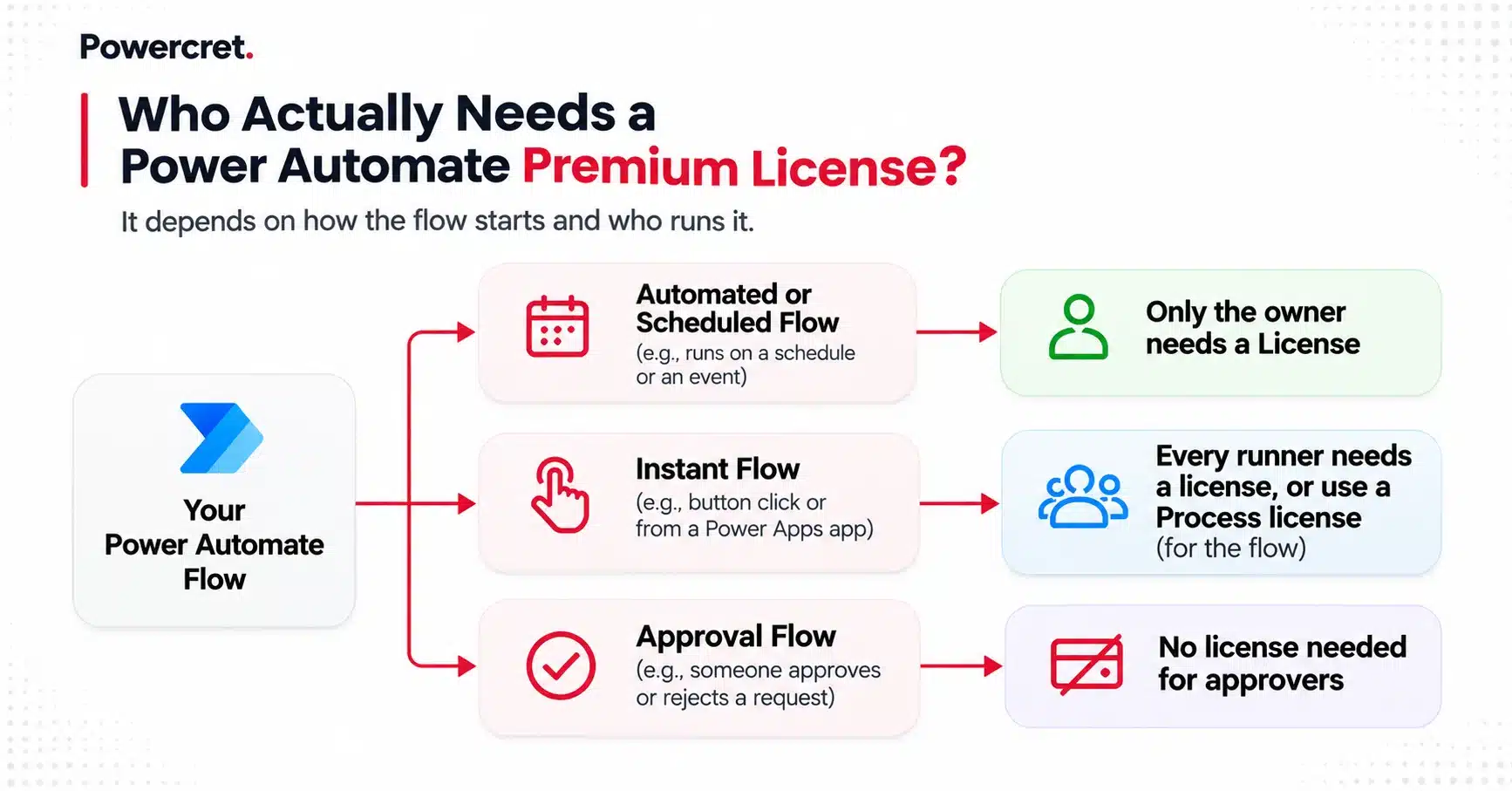
Automated and scheduled flows run on the owner’s license, whoever sets them off. Instant flows, including button and Power Apps-triggered flows, run on the license of whoever starts them. Microsoft’s licensing FAQ applies that rule as follows.
| Scenario | Who needs a paid license |
|---|---|
| Automated or scheduled flow with a premium connector | The owner only, or a Process license on the flow |
| Instant flow with a premium connector | Every person who runs it, or a Process license on the flow |
| Someone answering an approval request | Nobody, since approvers need no Premium seat |
| Guest user from another organization | The guest, licensed in your tenant or their home tenant |
| One service account running a flow for many users | A Process license on the flow |
| Flow inside a Dynamics 365 or Power Apps app, on its data | The existing Dynamics 365 or Power Apps license |
| Any flow in a Managed Environment | A standalone Power Automate license |
Two rules catch teams most often. One Premium seat on a service account that many people share counts as multiplexing, which Microsoft’s terms don’t allow. In Managed Environments, seeded Microsoft 365 and Dynamics 365 rights also stop covering flows.
Both rules belong in your Power Platform governance and Center of Excellence setup, where they can be enforced rather than discovered at renewal.
Now that you know who needs a seat, let’s look at how to license each flow for the lowest compliant cost.
Premium, Process or Pay-As-You-Go: How Should You License Each Flow?
Power Automate Premium vs Process is rarely an either-or choice. License the people who build, license the flows that many people run, and meter the flows that rarely run.
1. When Does One Process License Beat Ten Premium Seats?
One Power Automate Process license costs the same as ten Premium seats. So once more than ten people run the same premium instant flow, licensing the flow beats licensing every runner.
Flow groups stretch that math, because one Process license can cover up to 25 solution-aware cloud flows sharing 250,000 actions a day.
Process licenses apply per environment, though, so each production environment needs its own coverage. Each flow must also sit inside a solution before you can assign the license.
For automated flows, Process buys resilience rather than seat savings. If an owner loses Premium, Microsoft downgrades the flow and switches it off after 14 days unless someone acts.
2. When Is Pay-As-You-Go Cheaper Than a License?
A $15 Power Automate Premium license equals 25 premium cloud runs at $0.60, and a $150 Process bot equals 50 unattended runs at $3. Below those monthly volumes, pay-as-you-go billing through Azure costs less. Check five points before you switch an environment:
- Azure billing: You link each environment to an Azure subscription, and every premium run bills there.
- Preview status: Microsoft still labels the flow-run meters as preview, so rates can change.
- Process licenses stop counting: Pay-as-you-go environments ignore Process licenses, so keep those flows elsewhere.
- No extra actions: The overage meter isn’t live yet, so flows that hit action limits still need Process.
- Licensed users run free: Runs by people who already hold Premium aren’t charged while they stay within their license.
3. Worked Example: Licensing a 250-Person Company
Picture a 250-person company with 12 makers and two overnight bots that must run together. Staff use four request flows started from a button or app, with 150 regular runners. Finance also uses AI to read 3,000 invoice pages a month.
| Need | Everyone on Premium | Right-sized mix |
|---|---|---|
| 12 makers who build flows | 12 Premium seats: $180 | 12 Premium seats: $180 |
| 4 shared instant flows, 150 runners | 150 Premium seats: $2,250 | 1 Process license on a flow group: $150 |
| 2 concurrent overnight bots | 2 Process bots: $300 | 2 Process bots: $300 |
| AI invoice reading, 3,000 pages | Copilot Credits: $240 | Copilot Credits: $240 |
| Monthly total | $2,970 | $870 |
| Annual total | $35,640 | $10,440 |
The right-sized mix cuts annual license spend by about 70% at list price. It assumes the four flows are solution-aware and stay under 250,000 actions a day. Microsoft still recommends Premium for every user, so make the mix a deliberate cost decision.
When Do You Need RPA, and Which License Runs It?
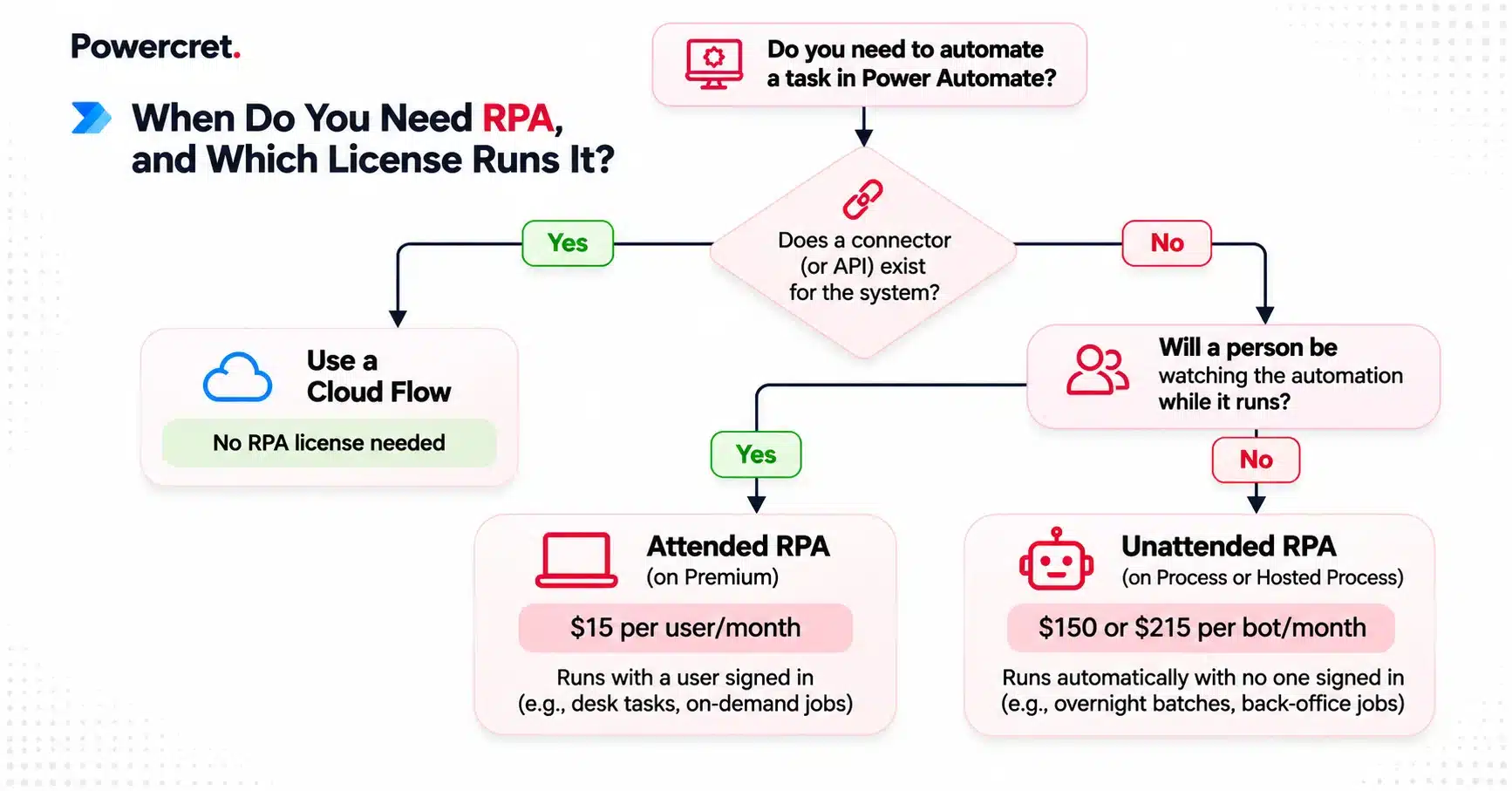
You need RPA only when a system has no connector or API, such as an old desktop ERP or a terminal screen. Then Premium covers runs a person watches, and each unattended run needs its own Power Automate RPA license.
| RPA mode | License and US list price | Who is signed in | Machine | Fits |
|---|---|---|---|---|
| Attended | Premium, $15 per user/month | The user, at their desk | The user’s registered PC | Desk tasks a person starts |
| Unattended | Process, $150 per bot/month | Nobody | Your PC or VM, paid separately | Overnight batches, back-office queues |
| Hosted | Hosted Process, $215 per bot/month | Nobody | Microsoft-hosted machine or group | Unattended work without managing VMs |
Look for a connector before you build a bot. A cloud flow calling an API runs faster and breaks less often than a bot clicking through screens. RPA earns its place with legacy desktop apps, terminal systems and portals that offer no API.
Power Automate for desktop also comes free with Windows for personal attended tasks. Cloud triggers, sharing, orchestration, and monitoring, however, all need Premium.
How Many Bots Do You Need? Size by Concurrent Runs, Not Process Count
Each unattended bot runs one desktop flow at a time. Ten nightly jobs that run one after another can share a bot, while two jobs that must start together need two bots.
Every RPA developer needs a Power Automate Premium license to build desktop flows, and a Premium user must register each bot machine.
Hosted Process costs $65 per bot more than Process but removes VM setup and patching. Once you pass a handful of bots, compare both options side by side.
Now that you’ve seen how RPA is licensed, let’s take a look at a check that turns all of this into renewal decisions.
Run This 10-Point License Check Before Your Next Renewal
Run these checks two to three months before renewal, while you still have time to move flows between licenses.
- Inventory premium flows: List every flow with premium or custom connectors, plus its owner and environment, using the CoE Starter Kit.
- Tag each trigger: Mark flows as automated, scheduled, or instant, because that decides who pays.
- Count instant-flow runners: Price a Process license, not a Power Automate Premium license per runner, for instant flows with more than ten regular runners.
- Group shared flows: Place related solution-aware flows into flow groups of up to 25 under one Process license.
- Cover every owner: Add a licensed co-owner to critical flows so a departure never switches them off.
- Retire shared accounts: Move flows that run under one service account for many users onto Process.
- Map environments: Confirm Process coverage per environment and standalone licenses in Managed Environments.
- Check action volume: Move flows that keep hitting their daily limit onto Process, which allows 250,000 actions.
- Budget AI usage: Price AI steps in Copilot Credits from your renewal date, based on monthly pages and prompts.
- Size bots by concurrency: Count simultaneous unattended runs and any Microsoft 365 Unattended Licenses they need.
Also Read: How to Decide Whether to Rescue a Stalled Dynamics 365 Implementation
Why Do Businesses Choose Powercret for Power Automate Licensing and RPA?
Choosing between Premium, Process, and pay-as-you-go is the easy part. Building flows and bots that stay compliant, governed, and cost-effective after go-live is where most automation programs stall.
That is where Powercret makes the difference. Through our Power Automate and RPA services, we map every premium flow to the right license. Then we build, govern, and support the automations that run on it.
What makes us stand out:
- Microsoft-only focus: A certified Microsoft consulting and implementation partner serving clients in 7 countries, with no SAP, Salesforce, or Oracle practice competing for attention.
- Senior people on every project: Senior consultants stay from scoping through delivery. Our founders spent more than a decade delivering Microsoft projects at bigger firms.
- Licensing optimization and cost modeling: Your premium flows mapped to the right mix of Premium, Process, and pay-as-you-go.
- RPA estate review: We assess your existing bots and recommend which to move to Power Automate, based on complexity and licensing cost.
- Governance built in: We deploy the CoE Starter Kit, configure DLP policies and environment boundaries, and set a managed solution strategy.
- Fixed price, no open-ended billing: A fixed price range and indicative timeline within 5 business days, agreed before the build starts.
- Clients who stay: A 98% client retention rate, backed by structured support after go-live.
Want to see real results? Powercret helped a Canadian non-profit build an AI-powered grant management system using Power Pages and Dynamics 365. Delivered in 3 months, it made application processing 3x faster with AI-powered document and ID checks.
Still unsure which license mix fits your flows?
Book a free consultation with our Power Automate experts and get a clear licensing plan before your next renewal. We propose call slots within one business day.
What This Means for You
The Power Automate Premium license is still the right choice for the people who build your flows. But you don’t need it for everyone. Most of the savings come from licensing shared flows the smart way and buying only the bots you really need.
The timing matters too. New and renewed licenses no longer include free AI credits, so check your flows before your next renewal.
Not sure where to start? An RPA-in-a-Day workshop is an easy first step. Your team gets hands-on time with Power Automate bots and learns which tasks really need one.
Connect with our experts to plan your RPA-in-a-Day workshop. We suggest call times within one business day.